Why You Need a Thru-Hike Itinerary
You have maps, guidebooks, Facebook groups, Reddit threads, gear notes, town recommendations, shuttle contacts, mileage charts, weather windows, resupply ideas, and 17 different opinions from strangers named Trail Dad. Useful, but not a plan. Yet.
A thru-hike itinerary gives all that information somewhere to land. It helps you organize your route before you leave, adjust the plan while you are out there, and keep your bigger picture from dissolving.
This template is not meant to lock you into a rigid schedule. Trails are an ever-changing ecosystem.
The point is not to follow the plan perfectly. The point is to have a plan smart enough to change.
Quick Planning Disclaimer: This template helps you organize your itinerary, but it does not replace current trail conditions, weather reports, local emergency guidance, land manager updates, transportation changes, permit rules, or your own judgment. Build flexibility into your itinerary. Leave room for reroutes, rest, weather, injury prevention, & the occasional town day.
Who This Is For
This template is especially useful if you are planning:
- A thru-hike or section hike
- A multi-day backpacking trip
- A climbing or mountaineering objective with approach days
- An international trek
- A long-distance trail with town stops and resupply points
- A route with changing weather, terrain, or elevation
- A solo trip where someone else needs to understand your timeline
- A trip where you want your plan, notes, files, and route details in one place
What's Inside
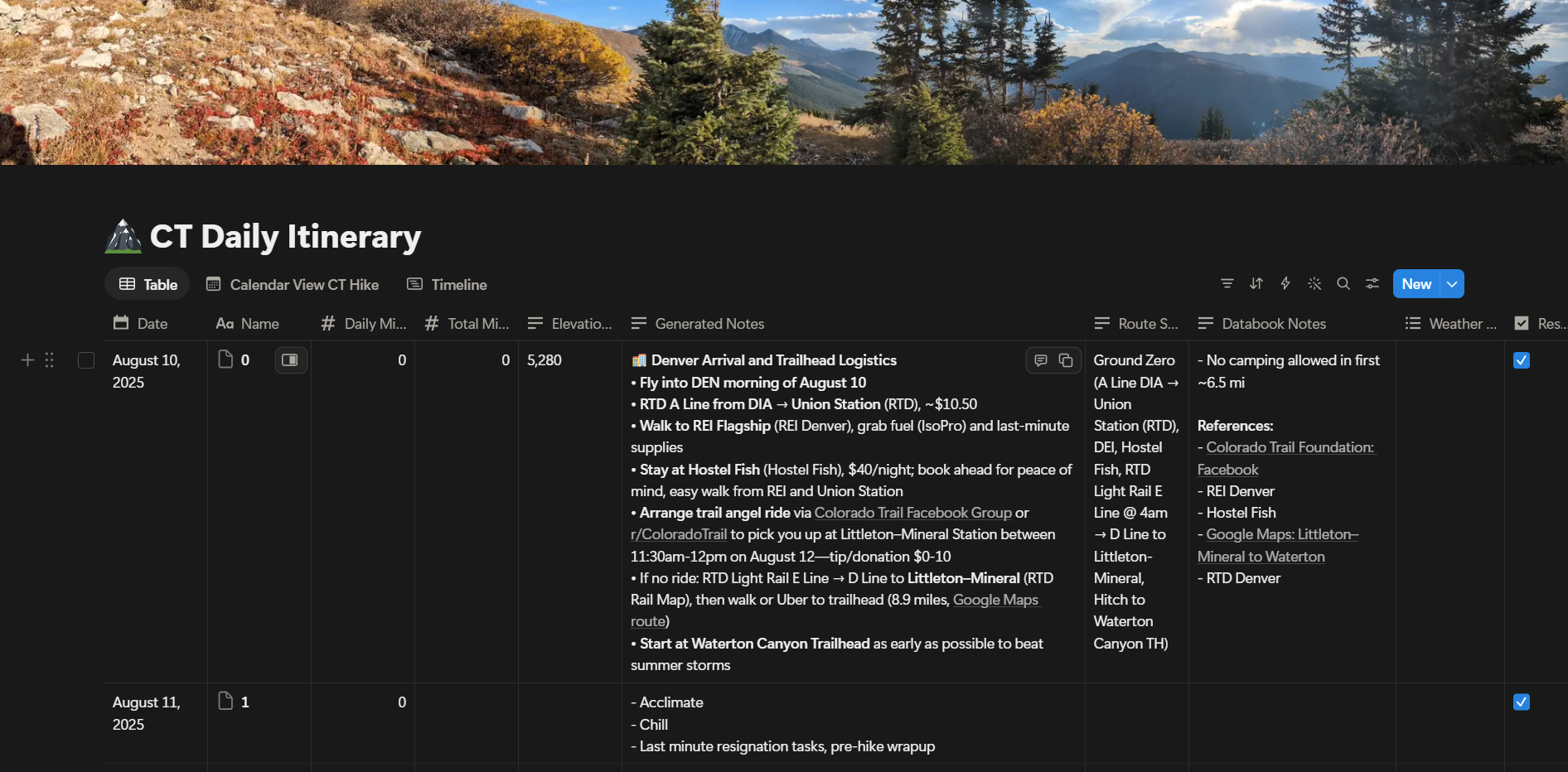
The Thru-Hike Itinerary Template gives you one flexible Notion workspace to organize the moving parts of a long trail.
Use it to plan each day, track route details, and keep your notes somewhere you can actually find them later.
Inside, you’ll find space for:
Daily Itinerary Planning: Plan dates, day numbers, daily mileage, total mileage, and route sections.
Elevation + Terrain Notes: Track climbs, descents, exposed sections, big pushes, and days that deserve extra respect.
Weather Considerations: Add forecast notes, storm windows, heat risk, snow, monsoon patterns, or seasonal concerns.
Reservations + Town Logistics: Keep lodging, permits, shuttle notes, flights, campsite reservations, and town stops in one place.
To-Do List Items: Attach pre-trip and on-trail tasks to the exact day or section where they matter.
Databook + Guide Notes: Save notes from guidebooks, apps, maps, forums, trail reports, or your own research.
Files + Media: Attach screenshots, maps, permits, confirmation emails, photos, PDFs, and other trip files.
Status Tracking: Mark days as not started, planned, adjusted, completed, or whatever system fits your route.
Multiple Views: Switch between Table, Calendar, and Timeline views depending on how you want to plan.
Day Pages: Each day is also its own Notion page, so you can add deeper notes, journal entries, resupply details, shuttle contacts, screenshots, and route updates as needed.
How to Use This Template
- Click the “Download Template” or “Get Notion Free” button.
- Create or log into your free Notion account.
- Click Duplicate in the upper-right corner of the Notion page.
- Choose the workspace where you want to save it.
- Open your copied version from your Notion sidebar.
- Start adding your route, dates, mileage, town stops, and notes.
- Switch between Table, Calendar, and Timeline views depending on how you want to plan.
- Before your trip, make sure Notion is available on your phone and set up any pages you may want to access offline.
This template is meant to be used before your trip and updated during your trip.
Build the first draft at home. Edit the living version on trail. Do not panic when the plan changes.
Want Help Planning the Bigger Picture?
A template can organize the information, while a strategy helps you decide what actually belongs in the plan.
If you are preparing for a long trail, high elevation objective, international trek, or unfamiliar terrain, I offer 1:1 expedition prep consulting for hikers and athletes working toward big goals.
This is for you if you want help with route planning, mileage progression, pacing, training, gear decisions, logistics, elevation, risk management, or turning a messy idea into a realistic plan you will actually follow.
For clients, I actually walk through how to use this itinerary system in practice, including how I plan my own thru-hikes and how to adapt the template to your route, timeline, fitness, and experience level.
You do not need another pile of tabs. You need a clear plan, a flexible system, and someone willing to tell you when your mileage plan is parting from reality.
Pair It With the Emergency Contact Plan
Once your itinerary is roughly built, the next step is sending the right information to the person who would coordinate help if you were overdue.
The Thru-Hike Itinerary Template helps you organize the plan.
The Type Two Fun Emergency Contact Plan helps your people know what to do with that plan if something goes sideways.
Use them together before a long trail, remote route, or international trek.